
Hotmail InboxChecker with open inbox — Complete Guide to Hotmail & Outlook Checking
Version 3.3.3 | Developed by ComboCloudX
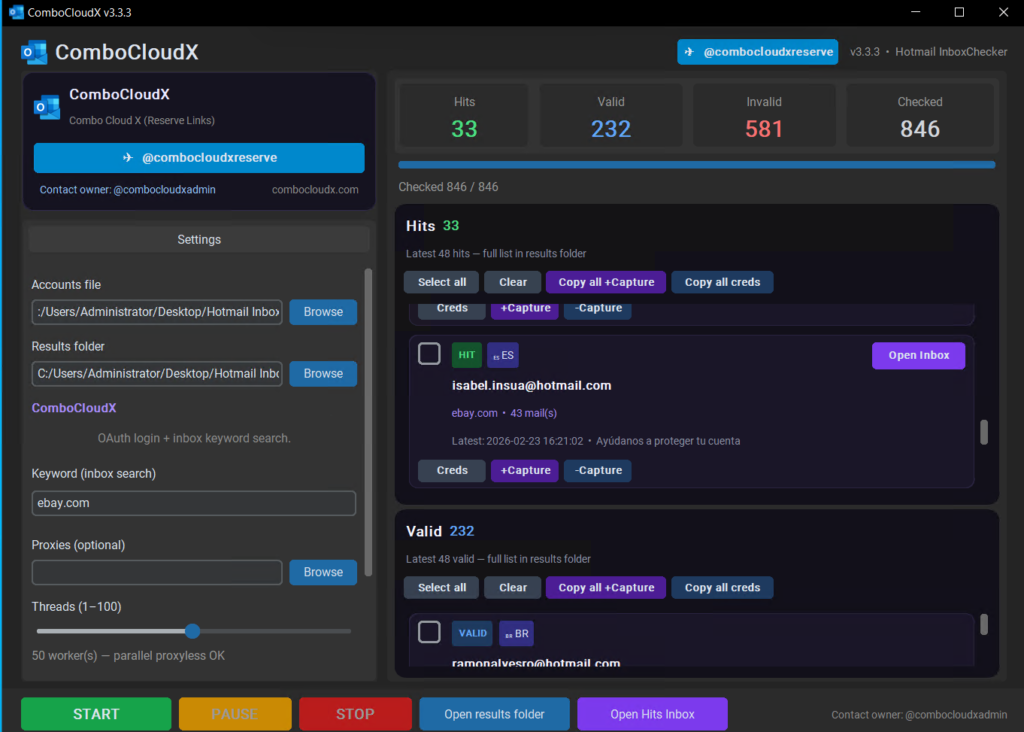
ComboCloudX Hotmail InboxChecker is a fast, portable desktop tool built for checking Hotmail, Outlook, and Live accounts at scale. It uses a direct OAuth login and Microsoft’s inbox search API — no browser automation, no Chrome required. Load your combo list, set your keywords, and get clear Valid, Invalid, and Hit results in seconds.
Whether you’re filtering mail access lists or hunting accounts with specific inbox content, ComboCloudX Hotmail InboxChecker gives you everything in one place: live results, rich reports, and a built-in inbox viewer.
What ComboCloudX Hotmail InboxChecker Does
ComboCloudX Hotmail InboxChecker is designed for three main jobs:
- Separate valid logins from invalid ones
- Search the inbox for specific keywords (brands, domains, senders)
- Open and browse real mailbox content without logging into outlook.com manually
It works on Hotmail, Outlook, and Live accounts worldwide.
Feature 1 — Valid vs Invalid Checking
When you run a check, every account in your list is tested with a real Microsoft login.
Valid (Mail Access)
Accounts that log in successfully are saved as Valid. These are working mailboxes — login works even if your keyword is not found.
Saved to: results/valid_mailaccess_[keyword]_[date].txt
Example line:
philip1deakin@hotmail.co.uk:Govinda1 | Country = AU | Name = Param Deakin | Mails = 37
Each valid line can include:
- Email & password
- Country
- Profile name
- Message count for your keyword (if searched)
Invalid (Bad Login)
Accounts with wrong passwords, locked accounts, or failed login are saved as Invalid.
Saved to: results/invalid_[keyword]_[date].txt
Example:
telmott@hotmail.com:Cheguevara71.
emmanuel_1188@hotmail.com:Akaaka1188
Hits (Keyword Match)
If login succeeds and your keyword is found in the inbox, the account is a Hit — the most valuable result.
Saved to: results/hits_[keyword]_[date].txt
Hit reports include:
- Profile name & country
- Inbox / Junk / Deleted counts
- Total messages matching your keyword
- Recent subject lines
- A direct Inbox Viewer link
Feature 2 — Inbox Keyword Checker
The keyword checker searches the real Outlook inbox via Microsoft’s search API — the same engine outlook.com uses.
How it works
- Account logs in via OAuth
- ComboCloudX Hotmail InboxChecker runs a search for your keyword
- Matching messages are counted and sampled
- Result is classified as Hit or Valid (no hit)
Single keyword
facebook.com
Multiple keywords (comma-separated)
facebook.com,paypal.com,amazon.com
Each keyword is checked separately. Hits are grouped per keyword in your results files.
What keywords can match
Keywords search across:
- Sender addresses
- Subject lines
- Message body / links
- Domain names inside emails
Good keyword examples
| Goal | Keyword to use |
|---|---|
| Facebook-linked accounts | facebook.com |
| PayPal activity | paypal.com |
| Amazon orders | amazon.com or amazon. |
| eBay messages | ebay.com |
| Disney+ accounts | disney or disneyplus.com |
| Banking / finance | Bank domain or sender name |
| Specific brand promo | Brand name or newsletter sender |
Tips for better keyword results
- Use the domain (
paypal.com) rather than justpaypal— fewer false positives - Try comma lists for multi-brand hunting:
netflix.com,spotify.com,hulu.com - One word brands work too:
uber,coinbase,binance - Keywords are not case-sensitive
- Results show total match count plus recent subjects so you can verify quality before opening the inbox
Feature 3 — Open Inbox Viewer
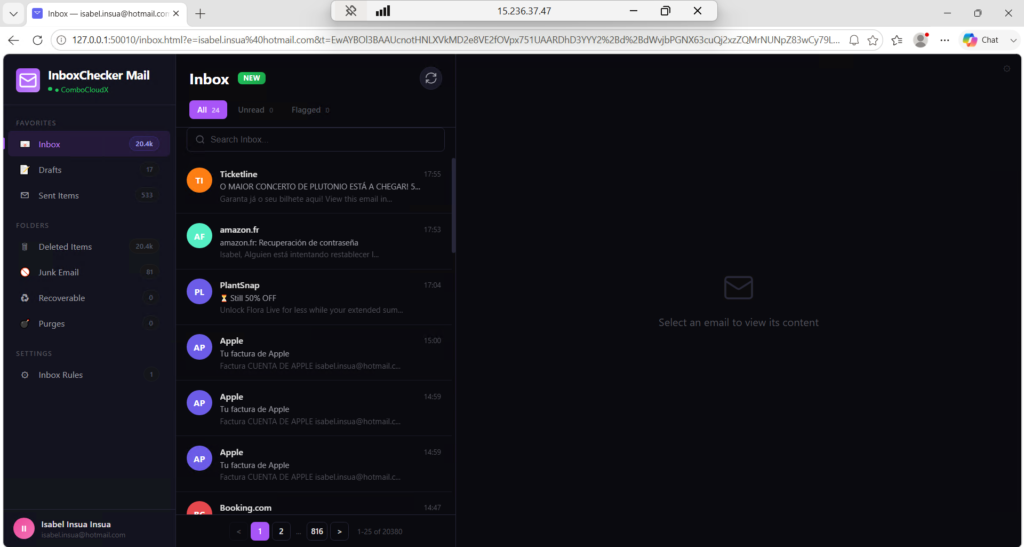
Every hit can be opened in a full Outlook-style inbox viewer built into ComboCloudX Hotmail InboxChecker.
Two ways to open it
From the app (live panel)
After a hit appears, click Open Hits Inbox in the GUI. Browse all hits from the current run in a clean 3-panel layout:
- Folder sidebar (Inbox, Sent, Junk, Deleted…)
- Message list with search & filters
- Full message reader with copy tools
From hit reports (direct link)
Each hit file includes an Inbox Viewer link valid for ~1 hour:
Inbox viewer (~1hr): file:///.../inbox_viewer.html?e=email@hotmail.com&t=...
Click the link to open that mailbox instantly.
Inbox Viewer features
- Read real emails from Inbox, Junk, Sent, and Deleted
- All / Unread / Flagged filters
- Search inside the mailbox
- Copy email content or full combo
- Folder message counts
- Works offline after session is loaded — no need to stay on outlook.com
Feature 4 — Inbox Rules & Forward Filter (Auto-Restore)
ComboCloudX Hotmail InboxChecker Mail includes a Rules panel for managing Outlook inbox rules directly from the viewer — including Forward and Redirect filters.
Supported rule actions
| Action | What it does |
|---|---|
| Forward | Forwards matching emails to another address |
| Redirect | Redirects emails (sender sees the redirect address) |
| Delete | Automatically deletes matching messages |
| Block sender | Moves mail from a sender to Junk |
Managed rules — auto-restore & re-enable
Rules created inside ComboCloudX Hotmail InboxChecker Mail are saved as managed rules.
If someone goes to outlook.com and:
- Deletes the rule → ComboCloudX Hotmail InboxChecker recreates it automatically (~every 05 seconds while viewer is open)
- Turns off the rule → ComboCloudX Hotmail InboxChecker re-enables it automatically
You’ll see a notification like:
Rule(s) 1 restored, 1 re-enabled on Outlook
Rules you delete using the × button inside ComboCloudX Hotmail InboxChecker are removed from the managed list and will not come back.
This keeps your forward filters and inbox rules active even if they’re changed on outlook.com.
How to Use ComboCloudX Hotmail InboxChecker — Step by Step
1. Prepare your files
Copy the entire Hotmail InboxChecker folder to your PC or RDP.
InboxChecker.exe
emailpass.txt       ← your accounts (email:password)
proxies.txt         ← optional, recommended for high threads
results/            ← output folder (auto-created)
emailpass.txt format:
user1@hotmail.com:Password123
user2@outlook.com:MyPass456!
user3@live.fr:Secret789
2. Launch the app
Double-click InboxChecker.exe or run Run InboxChecker.bat.
3. Configure settings
| Setting | Recommendation |
|---|---|
| Accounts file | Point to your emailpass.txt |
| Keyword | e.g. facebook.com,paypal.com |
| Threads | 5–15 without proxies; higher with proxies |
| Proxies | Optional but recommended for large lists |
4. Click START
Watch the live log and panels:
- Hits — keyword matches
- Valid — login OK, no keyword match
- Invalid accounts are saved silently to the results folder
5. Check your results
Open the results/ folder:
| File | Contents |
|---|---|
hits_[keyword]_[date].txt | Full hit reports + inbox viewer links |
valid_mailaccess_[keyword]_[date].txt | Working logins, no keyword |
invalid_[keyword]_[date].txt | Bad passwords / failed login |
Recommended Thread Settings
| Setup | Threads |
|---|---|
| No proxy, home IP | 5–10 |
| Small proxy list (10–50) | 10–20 |
| Large proxy list (100+) | 20–50 |
Without proxies, too many threads from one IP can trigger rate limits. Use proxies for big lists.
Why ComboCloudX Hotmail InboxChecker?
| Advantage | Detail |
|---|---|
| No browser needed | Pure HTTP API — faster and lighter than browser checkers |
| Accurate login detection | Real OAuth flow, fewer false valids |
| Rich hit reports | Country, name, inbox counts, subjects |
| Built-in inbox viewer | Read mail without opening outlook.com |
| Forward rule management | Create, restore, and protect inbox rules |
| Portable | Copy folder to any Windows PC or RDP |
| ComboCloudX support | Updates and help via Telegram |
Get ComboCloudX Hotmail InboxChecker
Website: combocloudx.com
Telegram Admin: @ComboCloudXAdmin
Reserve Channel: @combocloudxreserve
Join our Telegram channel for daily updates, tools, and support.
ComboCloudX Hotmail InboxChecker v3.3.3 — Fast Hotmail & Outlook inbox keyword checking with live inbox viewer and managed forward rules. Developed by ComboCloudX.
Download link here :